

Views: 0 Author: AOZORA Wireless Inc. Publish Time: 2025-11-14 Origin: Site


Wi-Fi 6 Router — that phrase shows up in a lot of product pages and comparison charts, but what does it mean for a real household or a small office? If your streaming stutters when multiple people are online, video calls drop frames, or a surge of smart devices makes the network sluggish, an upgrade can make an immediate, noticeable difference. This article explains the practical advantages of Wi-Fi 6, the everyday problems it solves, the features you should prioritize beyond headline speeds, and when an upgrade isn't worth it. AOZORA Wireless brings a decade of mobile connectivity expertise to these routers, and the guidance here focuses on what actually helps users — and what to look for next.
Wi-Fi 6, also known as 802.11ax, is the latest mainstream Wi-Fi standard designed for environments with many devices and higher expectations for latency and reliability. Unlike marketing blurbs that only advertise top speeds, Wi-Fi 6 changes how access points share the network so many devices can behave better at once.
Orthogonal Frequency-Division Multiple Access lets a router slice the wireless channel into smaller sub-channels so multiple devices can send or receive small packets simultaneously. In simple terms: the router can serve many devices at once without making each wait in line.
Multi-User Multiple Input Multiple Output was in previous standards but Wi-Fi 6 supports more simultaneous streams and improves uplink support. This helps when several devices stream or upload at the same time.
Target Wake Time coordinates when low-power devices wake to communicate, saving battery life for IoT gadgets and smart sensors.
Manufacturers often headline gigabit figures, but real benefits for users are typically:
Better device density handling so many phones, laptops, TVs and smart plugs co-exist without overwhelming the network.
Lower latency for gaming and videoconferencing, because the router manages airtime more efficiently.
Improved battery life for small wireless devices via TWT.
Expect improved reliability more than miraculous speed increases unless your internet plan and client devices also support those peak rates.
Many everyday frustrations stem from more devices and higher expectations. Wi-Fi 6 addresses the pain points below in practical ways.
User story: A family of five streams different shows across rooms while a tablet video-calls—no more constant buffering or one stream hogging the network. Wi-Fi 6's multi-user scheduling reduces contention and keeps multiple 4K streams and background downloads from colliding.
Competitive gamers and remote workers notice micro-latency spikes. Better airtime management and reduced retransmissions mean fewer hiccups during matches and clearer, more consistent conference calls.
Homes packed with sensors and battery-operated cameras benefit from TWT. Devices wake just when needed, reducing battery drain and minimizing network chatter from always-on polling.
Thinking about coverage and speed together helps you decide whether one router will do or if a mesh system is necessary.
If you live in a small-to-medium apartment or a compact house with few structural obstructions, a single, well-placed Wi-Fi 6 router often covers the whole space and delivers significantly better experience than older routers. If you have a large multi-floor home, thick concrete walls, or many dead zones, a Wi-Fi 6 mesh system or add-on extenders with Wi-Fi 6 support will deliver far more consistent coverage.
Antennas and radios, band support, and the quality of the radio front end matter:
Dual-band vs. tri-band: tri-band routers add an extra 5 GHz radio which helps when many clients are active or when mesh backhaul needs a dedicated channel.
Antenna count and tuning: more antennas usually mean better spatial diversity and range, but real-world design matters more than numbers alone.
2.4 GHz remains important for range and IoT compatibility, while 5 GHz offers faster, lower-latency links at shorter distances.
Don't assume the top aggregate speeds advertised will reach a single device. Real throughput depends on client capabilities, interference, distance, walls, and your ISP plan. For most homes, Wi-Fi 6 delivers steadier high-throughput for multiple devices rather than dramatically higher peak downloads for a single client.
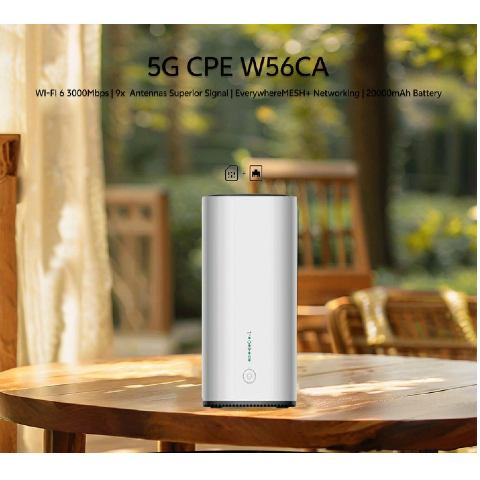
When comparing Wi-Fi 6 routers, focus on capabilities that produce everyday value.
Look for robust Quality of Service controls and strong multi-user scheduling. Routers that let you prioritize gaming or conferencing traffic keep important apps responsive even when the network is busy.
WPA3 is the current recommended Wi-Fi encryption standard. Equally important is a vendor that provides timely firmware updates and clear patching policies to keep networks secure.
Ethernet ports for wired devices, a multi-gig WAN port for faster ISP plans, and USB ports for local NAS or printer sharing increase the router's usefulness. If you plan a wired backhaul for mesh nodes, ensure gigabit or multi-gig LAN options.
A clear web UI or a well-designed app helps everyday users. Parental controls, guest networks, device-level scheduling and easy diagnostics are valuable for families and small businesses.
Upgrading to Wi-Fi 6 isn't always a smart spend. Check these signals before buying.
If your internet plan is modest and you use only one or two devices at a time, Wi-Fi 6 will provide modest gains. You might be better off optimizing placement of your current router or upgrading a single wired connection.
Some legacy devices won't take advantage of Wi-Fi 6 improvements and may even force performance compromises when they connect. Confirm devices support modern standards and firmware updates.
Higher-end Wi-Fi 6 routers add features like tri-band radios and hardware acceleration for many concurrent users. If you don't need those extras, mid-range Wi-Fi 6 models offer a better price-to-value balance.
AOZORA Wireless brings practical design priorities to its Wi-Fi 6 product line. The focus is on real-world reliability and long-term value rather than only chasing top-line speed numbers.
Enterprise-style firmware support and disciplined update cycles that prioritize security and stability.
Models optimized for multi-device households with strong MU-MIMO/OFDMA implementation so clients experience smoother streaming and fewer collisions.
Mesh-capable routers that work seamlessly with AOZORA extenders for large homes or small office spaces, enabling a balance of coverage and performance with intelligent band steering.
Hands-on management interfaces that let non-technical users configure QoS, guest networks, and parental controls without confusion.
Portable 5G CPE variants that combine cellular backup with dual-band Wi-Fi 6 for remote work, mobile offices, or events — useful when wired ISP access is unreliable.
These design choices mean AOZORA routers emphasize consistent, secure, and maintainable networks that match how people use their homes and small businesses today.
Use this simple decision map:
Small apartment, multiple devices (streaming + light gaming): mid-range Wi-Fi 6 router with good QoS and dual-band support.
Large house or unreliable coverage: Wi-Fi 6 mesh system with a dedicated backhaul radio or wired backhaul.
Power users with gigabit internet: high-end Wi-Fi 6 router with multi-gig WAN/LAN ports and tri-band radios.
Mobile or remote workers: AOZORA 5G CPE with Wi-Fi 6 for cellular-first connectivity and wired fallback.
User story: A remote design studio replaced an aging AC router with a tri-band Wi-Fi 6 mesh and regained consistent 4K collaboration streams for multiple artists working simultaneously.
Place the router centrally and at least waist height; avoid enclosed cabinets.
If you have many wired devices, use Gigabit Ethernet to reduce wireless congestion and improve reliability.
Separate guest networks to protect main devices and simplify bandwidth control.
Update router firmware regularly and enable WPA3 where possible.
For homes with heavy interference, try 5 GHz for performance and 2.4 GHz for range; consider mesh nodes where signals get weak.
If your household or small business feels crowded online and you want smoother streaming, lower latency, and better-managed multi-device performance, a Wi-Fi 6 upgrade is often a practical, future-proof step. AOZORA Wireless designs routers and 5G CPE devices that balance performance, security, and long-term firmware support to deliver consistent user experiences. For detailed product specs, datasheets, and to discuss which model fits your home or office, contact us — our team can help you compare models and find a solution that meets your needs. This category of products also includes Wireless Routers that pair cellular backup with Wi-Fi 6 for hybrid connectivity.


