

Views: 0 Author: Site Editor Publish Time: 2025-08-09 Origin: Site


Exploring harsh terrains requires more than just a map and compass. My Rugged Tablet is essential for adventurers facing extreme conditions. Unlike regular tablets, these devices thrive in dust, rain, and temperature extremes. In this post, you'll learn what makes rugged tablets indispensable for challenging environments and how they outperform standard devices in exploration settings.
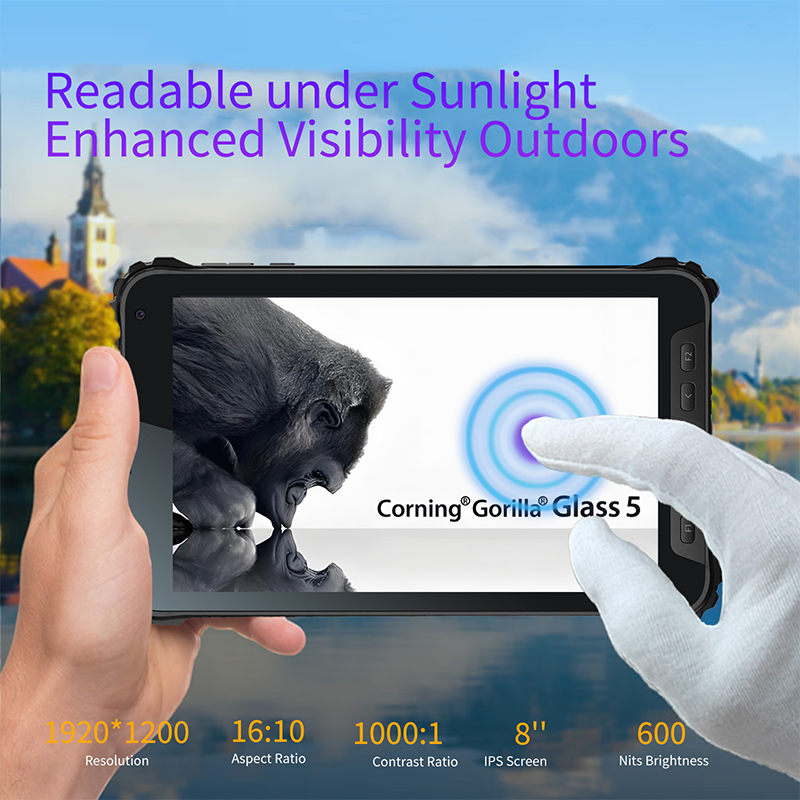
When we talk about rugged tablets, we're referring to devices built to last in tough environments. Unlike regular tablets, rugged tablets combine durability, protection, and performance to handle harsh conditions without breaking down.
Rugged tablets are specially designed to endure physical stress and environmental challenges. They usually feature:
Reinforced frames made from materials like magnesium alloy or hardened plastic.
Shock-absorbing internal components to survive drops and vibrations.
Sealed ports and enclosures to keep out dust, water, and other contaminants.
Screens that remain visible in bright sunlight and respond to gloved hands.
These tablets are not just tougher versions of consumer models. They are engineered from the inside out for reliability in demanding settings like construction sites, outdoor fieldwork, or emergency response.
Durability is the heart of ruggedness. Tablets must survive falls, jolts, and constant movement. They also need weather resistance to function in rain, dust storms, or extreme temperatures. Key features include:
Drop Resistance: Tested to survive multiple drops from several feet onto hard surfaces.
Waterproofing and Dustproofing: Protection against water splashes, immersion, and fine particles.
Temperature Tolerance: Ability to operate in freezing cold or scorching heat without failure.
Screen Technology: High-brightness, anti-glare displays for outdoor readability.
Touch Sensitivity: Screens that work with gloves or styluses for ease of use in various conditions.
These features come together to ensure rugged tablets keep working where others fail.
Two main standards help define ruggedness: MIL-STD-810G and IP ratings.
MIL-STD-810G: A military-grade testing protocol that evaluates how well a device withstands shocks, drops, vibrations, extreme temperatures, humidity, dust, and more. Passing these tests means the tablet can handle real-world abuse in the field.
IP Ratings (Ingress Protection): This rating measures how well a device resists dust and water. It has two numbers:
The first digit (0-6) rates protection against solids like dust.
The second digit (0-9) rates protection against liquids like water.
For example:
IP54 means partial dust protection and resistance to water splashes.
IP65 means dust tight and protection against water jets.
IP67 means dust tight and can survive immersion in water up to 1 meter for 30 minutes.
IP68 offers even higher levels of water protection.
To be truly rugged, tablets usually have at least an IP65 rating and meet MIL-STD-810G standards.
When exploring rugged tablets, three core features stand out—durability, environmental protection, and screen superiority. These elements ensure the device performs reliably in harsh conditions and tough environments.
Durability is the backbone of any rugged tablet. These devices are built to endure drops, shocks, and constant vibrations without failing. Manufacturers often test them against military standards like MIL-STD-810G or the newer MIL-STD-810H, simulating real-world abuse such as multiple drops from several feet onto concrete floors.
Key durability features include:
Reinforced Chassis: Frames made from magnesium alloy or hardened plastics provide a strong shell.
Shock-Absorbing Components: Internal dampeners protect delicate electronics from impact.
Sealed and Reinforced Ports: Prevent damage from accidental tugs or pressure.
For example, a rugged tablet designed for construction sites might survive falls from 4 to 6 feet without cracking or losing functionality. This toughness reduces downtime and replacement costs, making these tablets reliable tools for fieldwork.
Many rugged tablets come with high IP (Ingress Protection) ratings, certifying their resistance to dust and water. An IP65 rating means a device is dust-tight and can handle water jets, while IP67 or IP68 ratings indicate protection against full immersion in water for a limited time.
This protection is crucial for outdoor workers exposed to rain, dust storms, or muddy conditions. The sealed enclosures prevent dirt and moisture from damaging internal circuits, ensuring the tablet keeps working no matter the weather.
Additionally, rugged tablets often operate across a wide temperature range—from freezing cold to scorching heat—thanks to specialized components and thermal management systems. This resilience allows use in deserts, arctic zones, or industrial environments where temperatures fluctuate dramatically.
A rugged tablet’s screen must be visible and usable in all conditions. Outdoor work demands displays that remain clear under bright sunlight. To achieve this, rugged tablets typically offer:
High Brightness: Screens with brightness levels of 800 to 1000 nits or more.
Anti-Glare Coatings: Reduce reflections and improve contrast.
Specialized Display Technologies: Some use transflective LCDs or OLEDs optimized for outdoor visibility.
Moreover, field workers often wear gloves for safety or warmth. Regular touchscreens struggle to respond under such conditions. Rugged tablets solve this with glove-friendly capacitive touch technology or digitizer styluses that register input through thick gloves.
This combination of visibility and touch sensitivity ensures users can interact with maps, forms, or apps without removing gloves or squinting at the screen.
When exploring rugged tablets, power and connectivity are just as crucial as durability. Without reliable battery life and fast communication options, even the toughest tablet can fall short in the field. Let’s dive into the key aspects that make rugged tablets truly ready for exploration.
Explorers often spend hours or even days far from charging points. A rugged tablet needs a battery that lasts through long shifts without needing a recharge. Many models offer batteries that run 10 to 20 hours or more on a single charge. Some even have hot-swappable batteries, allowing users to swap out a drained battery for a fresh one without turning off the device. This feature is a game changer for continuous operation.
Power management software also plays a role by optimizing energy use based on workload and environmental conditions. Efficient processors help reduce power consumption without sacrificing performance. Together, these features keep the tablet running strong, so users can focus on their mission without worrying about losing power.
Staying connected is vital in remote or challenging environments. Rugged tablets often come equipped with multiple connectivity options to ensure users can access data, communicate, and navigate seamlessly.
5G and LTE: These cellular networks provide fast, reliable internet access even in remote areas. 5G offers higher speeds and lower latency, which means real-time data sharing and video streaming become possible on the go.
Wi-Fi: For areas with local networks, Wi-Fi remains a staple for quick data transfer and cloud access. Rugged tablets support the latest Wi-Fi standards to maximize speed and security.
GPS: Accurate location tracking is essential for navigation, mapping, and asset management. Built-in GPS modules provide real-time positioning, often enhanced with GLONASS or Galileo for global coverage.
With these connectivity tools, users can send reports, receive updates, or coordinate with teams no matter where they are.
Rugged tablets often serve as hubs for specialized tools and applications. They can connect to external devices like barcode scanners, sensors, or diagnostic instruments via USB, Bluetooth, or custom ports. This integration streamlines workflows by allowing data collection and analysis directly on the tablet.
Software compatibility is just as important. Many rugged tablets support industry-specific applications for fields like construction, healthcare, or public safety. Some run Windows for desktop-grade software, while others use Android for flexibility and app variety. The right tablet will seamlessly integrate hardware and software, boosting productivity in the field.
Rugged tablets have become essential tools across many industries where durability and reliable performance are critical. These devices excel in harsh environments where consumer-grade tablets would quickly fail. Key industries include:
Construction: Workers use rugged tablets to access blueprints, track progress, and manage safety inspections on dusty, wet, or rough job sites.
Healthcare: Medical staff rely on rugged tablets for real-time patient data, bedside charting, and secure communication, even in sterile or mobile environments.
Public Safety: First responders and law enforcement use rugged tablets for fast access to maps, incident reports, and communication during emergencies.
Logistics and Warehousing: Rugged tablets facilitate inventory management, barcode scanning, and real-time tracking in fast-paced, dusty warehouses or outdoor yards.
Utilities and Field Service: Technicians use these tablets for asset management, diagnostics, and reporting in remote or extreme weather conditions.
These industries benefit from rugged tablets' ability to combine mobility, toughness, and computing power, enabling workers to perform complex tasks efficiently.
Construction: On a construction site, a rugged tablet withstands drops from scaffolding and exposure to dirt or rain. It helps supervisors review digital plans, log daily reports, and communicate with teams. Features like glove-friendly touchscreens and sunlight-readable displays ensure usability despite gloves or bright outdoor light.
Healthcare: In hospitals or field clinics, rugged tablets provide doctors and nurses with instant access to electronic health records. Their antimicrobial coatings and sealed designs prevent contamination. Real-time data updates improve patient care and reduce errors.
Public Safety: Police officers, firefighters, and emergency medical teams rely on rugged tablets for navigation, incident logging, and live video feeds. The devices endure rough handling, extreme temperatures, and wet conditions while maintaining connectivity to command centers.
While consumer tablets may seem cost-effective initially, rugged tablets offer significant advantages that justify their investment:
Longevity: Rugged tablets last longer under tough conditions, reducing replacement frequency and lowering total cost of ownership.
Reliability: They maintain performance despite drops, dust, water, and temperature extremes, minimizing downtime.
Enhanced Features: Rugged models often include specialized tools like barcode scanners, GPS, and connectivity options (5G, LTE) tailored for field use.
Better Support: Enterprise-grade tablets come with dedicated technical support, software updates, and accessories designed for professional environments.
Choosing rugged tablets means fewer disruptions, safer operations, and more efficient workflows in challenging settings.
Selecting a rugged tablet isn’t just about picking the toughest device. It’s about finding one that fits your environment, tasks, and budget perfectly. Let’s break down the key factors to help you make the smartest choice.
First, think about where you’ll use the tablet. Will it face heavy dust, water, or extreme temperatures? For example, a tablet for desert exploration needs excellent dust protection and heat tolerance. In contrast, one for cold climates must work well in freezing conditions.
Next, consider the applications you’ll run. Do you need specialized software for mapping, data collection, or communication? Some tablets support Windows, making them ideal for complex desktop apps. Others run Android, offering flexibility and a vast app ecosystem.
Budget matters, too. Rugged tablets cost more than consumer models upfront, but they last longer and reduce downtime. Factor in the total cost of ownership—repairs, replacements, and productivity losses. Investing wisely saves money long-term.
Choosing between Android and Windows depends on your needs and preferences.
Android: Offers a user-friendly interface and access to millions of apps. It’s great for tasks needing mobility and simplicity. Many rugged tablets run Android, providing good security and regular updates. Ideal for field workers who need quick access to apps and cloud services.
Windows: Provides compatibility with legacy software and full desktop applications. It suits industries requiring powerful software, like engineering or GIS mapping. Windows tablets often have more robust processing power, making multitasking smoother.
Some models even offer dual-boot options or hybrid systems, allowing users to switch between Android and Windows depending on the task.
Price tags can be deceiving. A cheaper tablet might seem appealing but could fail quickly in harsh conditions, leading to costly replacements and lost work hours.
Consider these when evaluating cost:
Durability: How well does the tablet resist drops, water, dust, and temperature extremes? Higher durability means fewer repairs.
Battery Life: Longer battery life reduces downtime and need for extra batteries.
Support and Warranty: Check if the manufacturer offers comprehensive support, software updates, and warranty coverage.
Accessories and Integration: Compatibility with docks, scanners, or other gear adds value.
Lifecycle: Rugged tablets often have longer production lifecycles, ensuring easier replacement and consistent software support.
Choosing a tablet that balances upfront cost with these factors ensures better ROI and smoother operations.
Rugged tablets are built tough, but even the sturdiest device needs care to last long and perform well. Proper maintenance helps avoid unexpected failures and keeps your tablet ready for any challenge. Here are some best practices to extend your rugged tablet’s life and reliability in the field.
Regular Cleaning: Dust, dirt, and grime can accumulate on your tablet, especially in harsh environments. Use a soft, lint-free cloth dampened with mild cleaning solution to wipe down the screen and body. Avoid harsh chemicals or abrasive materials that might damage seals or coatings.
Inspect Seals and Ports: Check rubber gaskets and port covers frequently. These prevent water and dust ingress. Replace damaged seals promptly to maintain the device’s IP rating.
Handle with Care: Even rugged tablets have limits. Avoid unnecessary drops or impacts. Use protective cases or mounts when possible to add extra shock absorption.
Proper Storage: Store tablets in cool, dry places when not in use. Extreme heat or cold can degrade battery health and internal components.
Software updates do more than add features—they fix bugs, improve security, and optimize performance. Keeping your tablet’s operating system and apps up to date reduces crashes and vulnerabilities, which is crucial for field operations.
Accessories like styluses, keyboards, and docks also need attention. Clean connectors and moving parts regularly. Faulty accessories can cause device malfunctions or data loss.
Battery Management: Follow manufacturer guidelines for charging cycles. Avoid letting batteries drain completely or stay fully charged for long periods. Many rugged tablets offer hot-swappable batteries; use this feature to avoid downtime.
Routine Diagnostics: Use built-in tools or manufacturer software to monitor hardware health. Early detection of issues like overheating or storage errors prevents major failures.
Training and Protocols: Educate users on proper handling and maintenance routines. Consistent care across teams ensures all devices stay in top condition.
Rugged tablets are essential for exploration, offering durability, environmental protection, and advanced screen technology. These features ensure reliable performance in harsh conditions. They withstand drops, resist dust and water, and provide clear, glove-friendly touchscreens. Long battery life and connectivity options like 5G and GPS enhance their utility. Aozora Wireless offers rugged tablets that excel in these areas, providing exceptional value for professionals in demanding environments. Their products are designed to boost productivity and reduce operational disruptions.
A: Rugged tablets are designed for durability and performance in harsh environments.
A: MIL-STD-810G and IP ratings define ruggedness.
A: They have specialized components and thermal management systems.
A: Rugged tablets offer longevity, reliability, and specialized features.
A: Regular cleaning, software updates, and careful handling extend its lifespan.


